 LLM Hub
Case Study: LLM Hub Went from Android to iOS in Six Weeks
How we ported LLM Hub, our on-device AI app with 15+ offline models, from Android to iOS in six and a half weeks using the RunAnywhere SDK. Solo developer, first Swift project, models up to 31B parameters running on an iPhone.
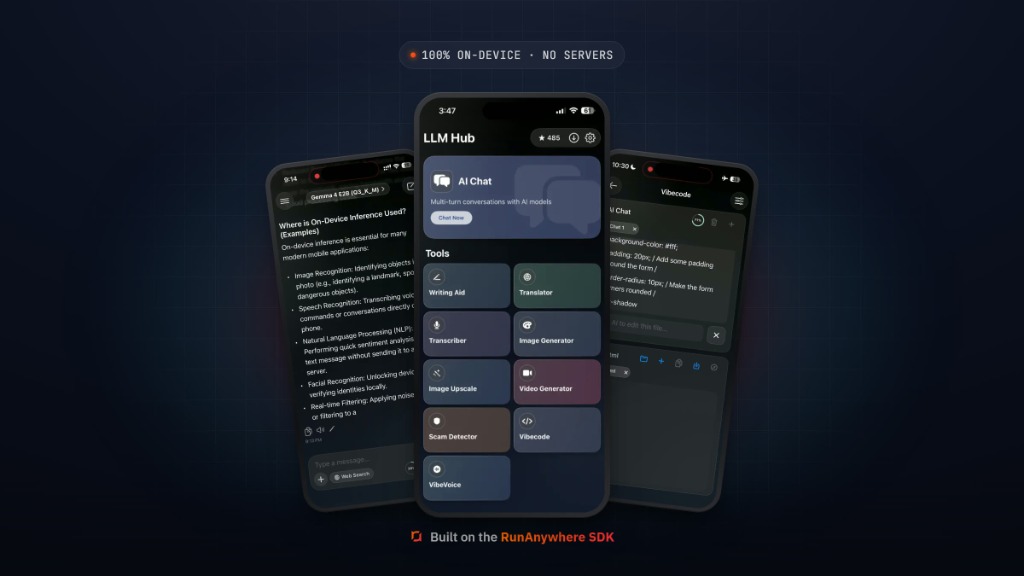
LLM Hub started as an Android app. It runs more than 15 AI models entirely on the phone: chat, image generation, video generation, music generation, translation, transcription, all of it offline, with no account and no server doing the thinking. Android came first because that is where the tooling was familiar. Then the emails started arriving from iPhone owners asking when iOS was coming.
The honest answer, for a while, was "we don't know." Porting an on-device AI app is not like porting a normal app. The interface is the easy part. The hard part is the inference layer: getting large models to load fast, run within a phone's memory limits, and stay stable across a feature set that includes text, image, video and audio generation. On Android that layer had been built up over a long time. On iOS it did not exist yet.
This is the story of how that port got done in six and a half weeks, by one developer, as a first Swift project. RunAnywhere, whose SDK the port is built on, published their own case study of the project. This post is our side of it.
The starting point
Three facts defined the project before a line of Swift was written.
First, the app could not shrink. An iOS version with half the models and a note saying "more coming soon" would have been a different, worse product. The whole point of LLM Hub is that everything runs on the device, so the port had to carry the full feature set: 15+ models covering chat, Stable Diffusion image generation, video generation, music generation, a translator, a Whisper transcriber and the rest.
Second, the team was one person. No iOS specialist to hand it to, no parallel workstreams. Whatever got built had to be buildable and maintainable by a solo developer.
Third, it was a first Swift project. Not a first programming project, but the language, the toolchain and the platform conventions were all new. Any plan that assumed deep iOS expertise was a fantasy.
The decision that made the timeline possible
The pivotal choice was to build on an existing on-device inference SDK, RunAnywhere, instead of writing a bespoke iOS inference layer from scratch.
Hand-rolling inference is where porting timelines go to die. Model loading, memory management, hardware acceleration differences between chips, format quirks: each one is a week of debugging if you meet it alone. An SDK concentrates that pain in a layer someone else maintains, and lets the port focus on the app itself: features, interface, and the unglamorous work of making 15+ models behave identically on a new platform.
It was not a free ride. Building a full app on a young SDK means you hit its edges regularly. Over the course of the port we contributed more than 16 SDK builds back upstream. That is worth stating plainly, because it is how this kind of project actually works: you adopt the layer, you find its limits at production scale, and you fix them in the open so the next developer does not have to. The port went faster because of the SDK. The SDK got better because of the port.
What shipped
Six and a half weeks after the first commit, LLM Hub was live on the App Store with feature parity that mattered:
- The full model catalogue, running locally on iPhone, up to 31 billion parameters
- Chat, image, video and music generation on-device, no cloud calls
- Translator and transcriber working offline
- No accounts, no tracking, the same privacy posture as the Android app
The number we still find slightly absurd is 31B. A 31-billion-parameter model running on a phone, in an app whose iOS version was its developer's first Swift project, six and a half weeks after the first commit. That is not a boast about typing speed. It is what happens when the inference layer is a solved problem you build on rather than a research project you repeat.
What we would tell another small team attempting this
Pick the layer, then commit to it. Half the port's speed came from refusing to relitigate the inference decision mid-project. Evaluate hard for a week, choose, and build.
Ship parity, not a demo. Users do not grade ports on a curve. The iOS app had to be LLM Hub, whole. Scoping to the real product, rather than a reduced launch, kept every decision honest.
Contribute upstream early. When you find an SDK bug at 1 am, you have two options: work around it privately, or fix it where it lives. The fixes we sent upstream came back as a more stable base for the exact app we were shipping. Sixteen-plus builds later, that loop was a feature, not overhead.
A first project in a language is fine. Deep platform expertise matters most when you are fighting the platform. When the hard problems live in a layer you have chosen well, a strong developer new to the language can move very fast. The six-and-a-half-week timeline is the evidence.
Read the full case study
RunAnywhere's write-up covers the project from the SDK side, including the technical approach and the results: LLM Hub iOS case study on the RunAnywhere blog.
If you are looking at your own Android-only app and an iOS-shaped gap in your roadmap, or you are building something new that has to run AI on-device from day one, this is the work LLM Hub Studio does. Get in touch and tell us what you are building.
Questions
How long did it take to port LLM Hub from Android to iOS?
Six and a half weeks from the first commit to the App Store release. The port was built on the RunAnywhere SDK by one developer, and it was that developer's first Swift project.
What did the iOS version of LLM Hub need to run?
The full on-device feature set: AI chat, image generation, video generation, music generation, translation, transcription and more, all running locally on the phone with no cloud inference. On iOS the app runs models up to 31 billion parameters.
What is RunAnywhere?
RunAnywhere is an SDK for running AI models on-device. We built the iOS port of LLM Hub on it instead of hand-rolling our own inference layer, and contributed more than 16 SDK builds back upstream during the port.
Where can I read the full case study?
RunAnywhere published the full case study on their blog: 'LLM Hub iOS case study' at runanywhere.ai. It covers the timeline, the technical approach and the results in their words as the SDK vendor.
Can LLM Hub Studio port or build an on-device AI app for us?
Yes. Porting and building private, offline-first AI apps is what the studio does. If you have an app that needs on-device AI on a new platform, contact us at timmy@llmhub.com.au.
Keep reading

The Tech Stack Behind LLM Hub: 15+ AI Models in One App
LLM Hub runs 15+ AI models entirely on the phone — chat, images, music, code, translation and transcription. Here is the tech stack that makes it work.

Why LLM Hub Bans Chinese AI Models
LLM Hub bans Chinese AI models by policy and enforces it in code. Here is what the ban removes, the sourced reasons behind it, and what runs in their place.

Claude Haiku 5.5 vs Small Chinese Models: Price Per Million Tokens Compared
Claude Haiku 5.5 costs $0.10/$0.50 per million tokens. We compare its verified pricing against the performance benchmarks — and why price alone doesn't decide.